This release is built on top of the database change we started in August, and it’s led by one big shift: every person you deal with now has a single profile, no matter how many communities, lots or emails they’re connected to. Alongside it, invoice approvals get sharper, quote voting drops an old restriction, and resident conversations get a proper upgrade.
Release highlights
- One profile per person: a single record and login for every person, across every community and lot they’re part of, with support for multiple emails
- Invites become deliberate: contacts get a profile automatically, they only get an account and login once you actually invite them
- Invoice approvals get sharper: skip the review step, auto-complete linked work orders, auto-export to Strata Master, and reassign approvers mid-flow
- Quote voting without a minimum: send a single contractor quote to committee, no need to wait on a second
- Richer resident request conversations: file attachments and a proper two-way thread, now live for every resident, not just committees
 One person, one login
How do you stop one person turning into three different records?
Admin
Resident
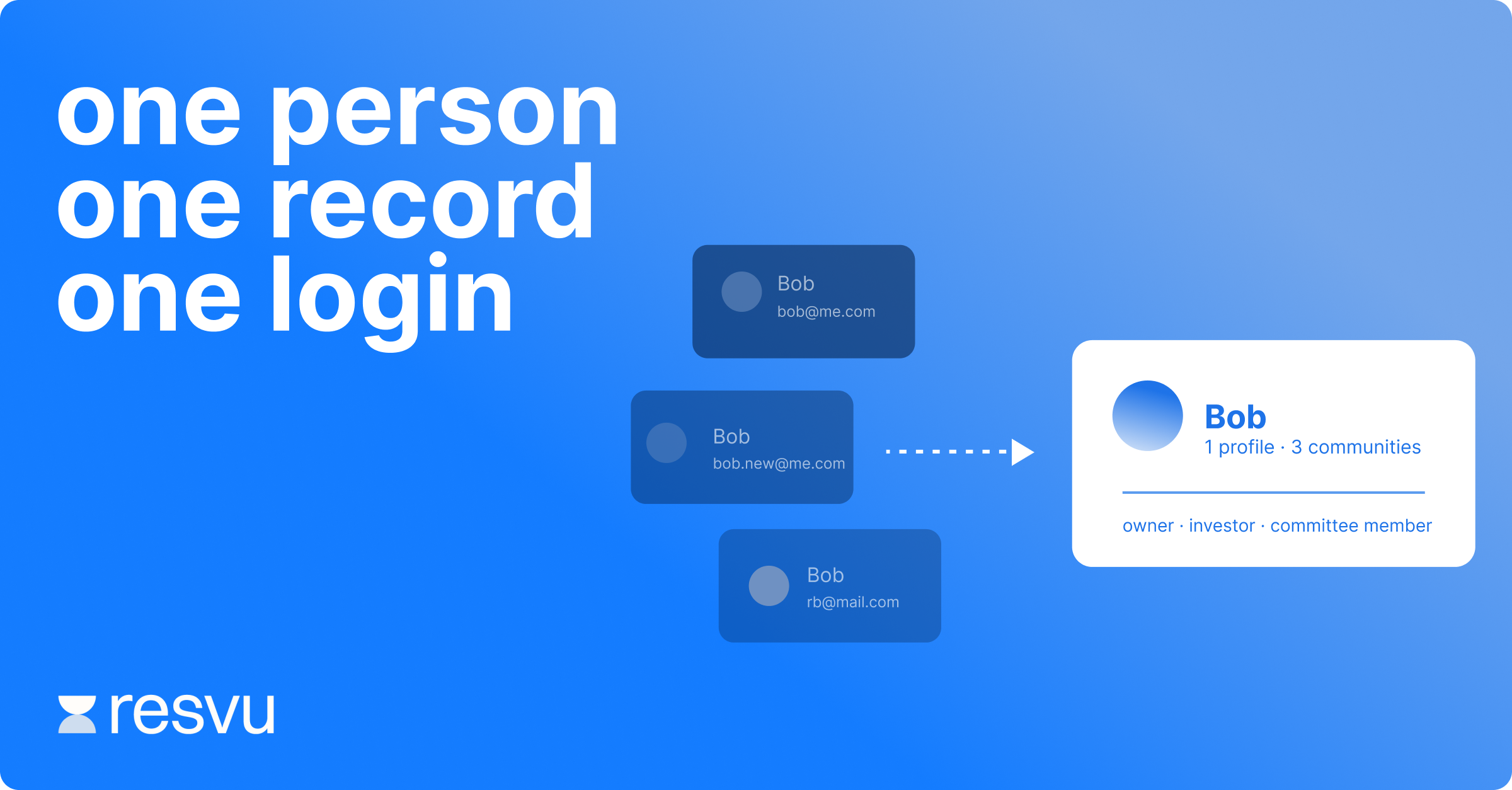
Here’s a scenario every strata manager will recognise. A lot owner, let’s call him Bob, comes across from your accounting platform on day one with an email address. Three weeks later, Bob updates that email. Under the old model, that created a brand new record for Bob in resvu, because of how the sync has to work with different accounting partners. Change his email again, or change his lot, and you’ve got a third or fourth record.
The result: Bob ends up with multiple logins, a new password to set every time, and old records drifting off to the archive tab. For your team, it gets confusing fast, working out which “Bob” you’re actually messaging, and there’s no single view of everything attached to that lot over time.
This release fixes that at the root. Bob is now one person, one record, one login, no matter what changes on the accounting side. resvu holds a single view of every lot, every community and every role he holds, whether he’s an owner, an investor or a committee member, and it’s the source of truth for logging in. If his email changes, he doesn’t need to reset anything, and any verified email on the account can be used to sign in.
It changes how invites work, too. Adding, importing or bulk-uploading a contact now just creates their person record, nothing else happens until you deliberately invite them, and only then do they get an account and login. People without an account still get a full profile (still reachable for alerts, notices and newsletters), and tenants self-registering via QR code now land in a pending tab for your approval, rather than an account being created automatically. On the list and detail pages, one person now shows as one row, with an expandable panel for every community and lot they hold, and search now works across all of it.
It’s a genuine rebuild of how resvu handles people, so expect more detail and support from us over the coming weeks as it rolls out.
Invoice approvals get sharper
How do you get invoicing to work the way your team already does?
Improvement
Feedback Driven
Invoice approvals moved into beta last month, and the feedback’s been flowing in, particularly from teams on accounting platforms beyond Strata Master (we’re working with our partners on that). This release adds a batch of small changes that add up:
- Turn off the approval-rules popup and skip straight to sending, if you don’t need to see it every time
- Automatically mark a linked work order as complete once its invoice is fully approved and sent for payment
- Automatically export fully approved invoices to Strata Master, instead of exporting manually
- Set up a pool of internal approvers for any step, so either of two people can approve and the job doesn’t stall
- Reassign approvers on a partially approved invoice, with a reason recorded, for when a committee member is on leave
- A new “next” button to cycle through open invoices while you code, plus a save-as-draft option and a “review and send” button (previously “validate invoice”)
- A new exported tab, so closed invoices don’t clutter the working view, with filters and export still available
Invoice approvals aren’t meant to replace a tool you already use and love. It’s there to fill a real gap for the businesses that don’t have one, standard or with AI-assisted coding (we’re still finalising how that’s priced).
Quote voting, simplified
How do you get sign-off on a single quote without the wait?
Improvement
Feedback Driven
Last month we introduced multi-quote voting, and the feedback was clear: requiring two contractor quotes before a vote could start was getting in the way. It’s gone. You can now send a single contractor quote straight to committee for a vote, same as always, just without the wait.
Resident requests, now with attachments
How do residents share more without leaving resvu?
Improvement
Feedback Driven
The upgraded activity view on requests, previously only available to committee members, is now live for every resident. It reads like a proper conversation, their comments on one side, your responses and updates on the other, with the option to expand for anything longer. Residents can now attach files directly to their comments, and your team sees everything they upload in the activity log on the admin side too. It’s a small change with a big effect on how much back-and-forth stays inside resvu instead of spilling into email.
The theme, in short
resvu isn’t here to build an AI strata manager, it’s here so every strata manager has more time for relationships. That’s really what this release is about underneath the mechanics: one clean record per person so your team spends less time untangling logins, and a handful of approval and communication changes that quietly take friction out of the day.
The resvu team
Have feedback on what we build next? We’re always listening. Reach out to your account manager or drop us a note at [email protected]